> ## Documentation Index
> Fetch the complete documentation index at: https://tracecat-codex-docs-secrets-oauth-discoverability.mintlify.site/llms.txt
> Use this file to discover all available pages before exploring further.
# OAuth
> Connect OAuth providers to Tracecat and reference managed OAuth tokens in expressions: configure scopes, refresh credentials, and call APIs from actions and agents.
## Overview
Tracecat supports built-in OAuth integrations and custom OAuth providers. OAuth integrations expose tokens through secret expressions.
 ## Grant types
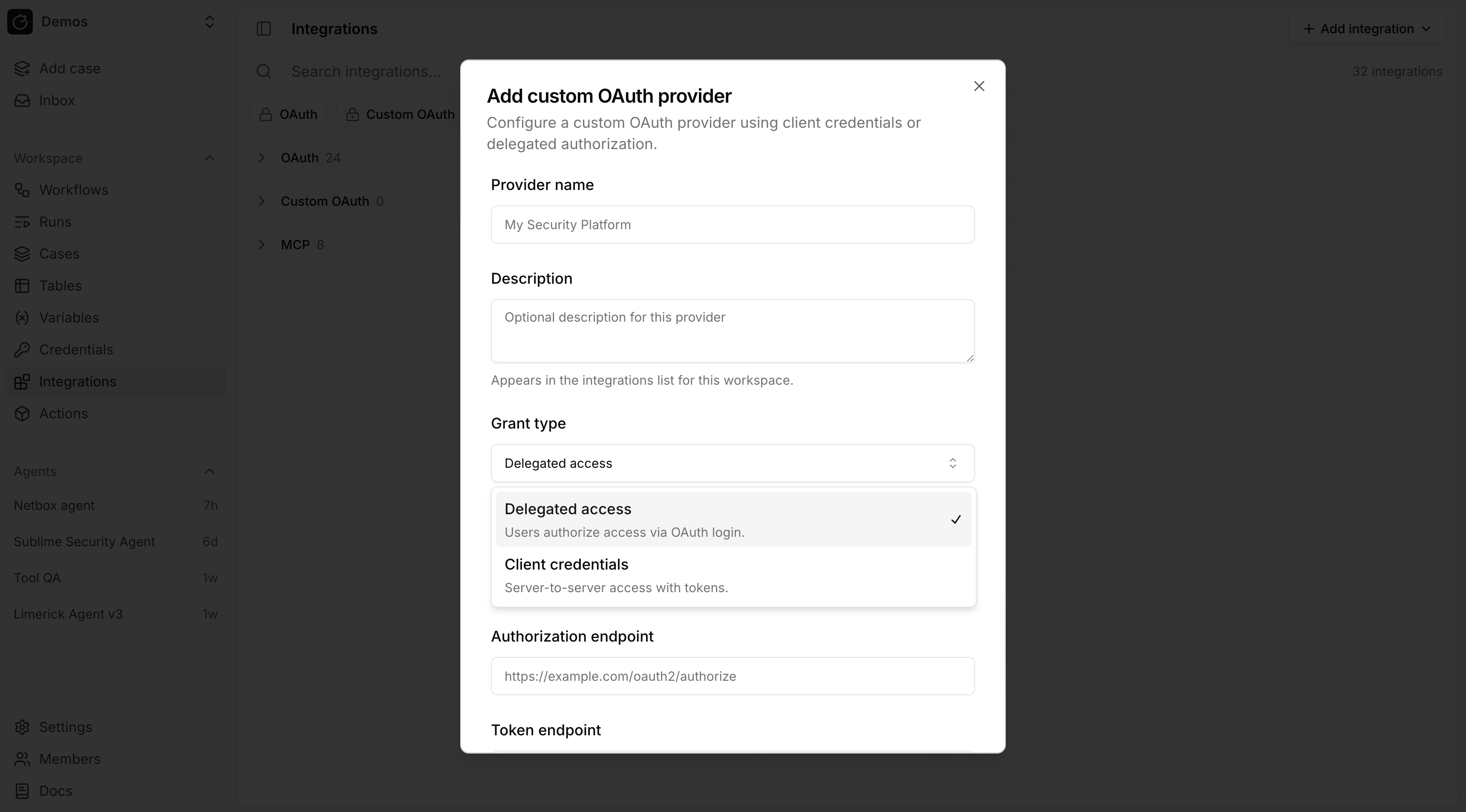
OAuth grant types:
* Delegated access (`authorization_code`): Tracecat stores a user token after a user completes the OAuth login flow.
* Client credentials (`client_credentials`): Tracecat stores a service token for server-to-server access.
## Configure a provider
Built-in OAuth integrations are listed on the Integrations page. For custom OAuth, use Add integration → OAuth provider (or Add custom OAuth provider under Custom OAuth).
Most providers require these fields:
* Client ID
* Client secret
* Authorization endpoint
* Token endpoint
* Scopes
After you save a custom provider, connect it (complete the OAuth flow) when using delegated access so Tracecat can issue tokens.
## Use OAuth tokens in expressions
OAuth expressions use the provider's exact ID, not its display name.
* Built-in providers use stable lowercase IDs assigned by Tracecat, with
underscores between words, such as `slack`, `google_drive`, and
`microsoft_sentinel`.
* Custom providers use an ID derived from the provider name, or from the
requested ID when you create one through the API. Tracecat slugifies it with
underscores and prepends `custom_`. `My Security API` becomes
`custom_my_security_api`. If that ID is already used for the same grant type,
Tracecat appends `_1`, `_2`, and so on.
Append `_oauth` to the exact provider ID for the secret name. For the key,
uppercase the complete provider ID, preserve its underscores and any numeric
suffix, then append `_USER_TOKEN` for `authorization_code` or `_SERVICE_TOKEN`
for `client_credentials`.
```yaml theme={null}
# authorization_code grant
${{ SECRETS._oauth._USER_TOKEN }}
# client_credentials grant
${{ SECRETS._oauth._SERVICE_TOKEN }}
```
A built-in `google_drive` authorization-code provider and a custom
`custom_my_security_api` client-credentials provider resolve as:
```yaml theme={null}
${{ SECRETS.google_drive_oauth.GOOGLE_DRIVE_USER_TOKEN }}
${{ SECRETS.custom_my_security_api_oauth.CUSTOM_MY_SECURITY_API_SERVICE_TOKEN }}
```
When either grant type is allowed, use a fallback:
```yaml theme={null}
${{ SECRETS.microsoft_sentinel_oauth.MICROSOFT_SENTINEL_USER_TOKEN || SECRETS.microsoft_sentinel_oauth.MICROSOFT_SENTINEL_SERVICE_TOKEN }}
```
Tracecat refreshes expiring authorization-code tokens when the provider
issued a refresh token, and reacquires client-credentials tokens with the
stored client credentials. The expression resolves only to the current
access-token string, which may be a JWT or an opaque token, not the refresh
token.
## OAuth and actions
Registry actions reference OAuth integrations but do not create them. Configure a built-in or custom provider in Integrations first, then declare `RegistryOAuthSecret` (Python) or `type: oauth` (YAML) so the action requires that integration at runtime. Syntax and examples are in [Use OAuth tokens in expressions](#use-oauth-tokens-in-expressions) above.
## OAuth and MCP
Remote MCP integrations can use an existing OAuth integration. For custom remote MCP servers:
1. Create a custom OAuth provider.
2. Connect that provider.
3. Create an MCP integration and attach the connected OAuth integration.
## FAQ
No. `RegistryOAuthSecret` and YAML `type: oauth` entries declare that the action *requires* an existing OAuth integration — they do not register one. Create the integration from [Configure a provider](#configure-a-provider) (or [contribute a built-in provider](#how-do-i-contribute-a-built-in-oauth-provider)). Once it exists, your action can reference its tokens via `${{ SECRETS._oauth... }}`.
Out-of-the-box providers are implemented in the Tracecat app and get stable IDs (for example `slack`, `google_drive`) without the UI `custom_` rule.
1. Subclass `AuthorizationCodeOAuthProvider` or `ClientCredentialsOAuthProvider` under [`tracecat/integrations/providers/`](https://github.com/TracecatHQ/tracecat/tree/main/tracecat/integrations/providers). See [`slack/oauth.py`](https://github.com/TracecatHQ/tracecat/blob/main/tracecat/integrations/providers/slack/oauth.py) for a full example.
2. Register the class in [`_PROVIDER_CLASSES`](https://github.com/TracecatHQ/tracecat/blob/main/tracecat/integrations/providers/__init__.py).
3. Keep the [registry package](https://github.com/TracecatHQ/tracecat/tree/main/packages/tracecat-registry) aligned: same `provider_id` and `grant_type` in `RegistryOAuthSecret` (Python) and `type: oauth` entries (YAML) so actions resolve the same integration as the UI.
## Related pages
* See [Prebuilt credentials](/automations/integrations/prebuilt-credentials) for static credentials such as API keys and bot tokens.
* See [Secrets](/automations/core-concepts/secrets) for how secret expressions are resolved at runtime.
* See [Python UDFs](/custom-actions/python-udf) and [YAML templates](/custom-actions/yaml-template) for custom registry actions.
* See [MCP servers](/automations/integrations/mcp-integrations) for remote and `stdio` MCP setup.
## Grant types
OAuth grant types:
* Delegated access (`authorization_code`): Tracecat stores a user token after a user completes the OAuth login flow.
* Client credentials (`client_credentials`): Tracecat stores a service token for server-to-server access.
## Configure a provider
Built-in OAuth integrations are listed on the Integrations page. For custom OAuth, use Add integration → OAuth provider (or Add custom OAuth provider under Custom OAuth).
Most providers require these fields:
* Client ID
* Client secret
* Authorization endpoint
* Token endpoint
* Scopes
After you save a custom provider, connect it (complete the OAuth flow) when using delegated access so Tracecat can issue tokens.
## Use OAuth tokens in expressions
OAuth expressions use the provider's exact ID, not its display name.
* Built-in providers use stable lowercase IDs assigned by Tracecat, with
underscores between words, such as `slack`, `google_drive`, and
`microsoft_sentinel`.
* Custom providers use an ID derived from the provider name, or from the
requested ID when you create one through the API. Tracecat slugifies it with
underscores and prepends `custom_`. `My Security API` becomes
`custom_my_security_api`. If that ID is already used for the same grant type,
Tracecat appends `_1`, `_2`, and so on.
Append `_oauth` to the exact provider ID for the secret name. For the key,
uppercase the complete provider ID, preserve its underscores and any numeric
suffix, then append `_USER_TOKEN` for `authorization_code` or `_SERVICE_TOKEN`
for `client_credentials`.
```yaml theme={null}
# authorization_code grant
${{ SECRETS._oauth._USER_TOKEN }}
# client_credentials grant
${{ SECRETS._oauth._SERVICE_TOKEN }}
```
A built-in `google_drive` authorization-code provider and a custom
`custom_my_security_api` client-credentials provider resolve as:
```yaml theme={null}
${{ SECRETS.google_drive_oauth.GOOGLE_DRIVE_USER_TOKEN }}
${{ SECRETS.custom_my_security_api_oauth.CUSTOM_MY_SECURITY_API_SERVICE_TOKEN }}
```
When either grant type is allowed, use a fallback:
```yaml theme={null}
${{ SECRETS.microsoft_sentinel_oauth.MICROSOFT_SENTINEL_USER_TOKEN || SECRETS.microsoft_sentinel_oauth.MICROSOFT_SENTINEL_SERVICE_TOKEN }}
```
Tracecat refreshes expiring authorization-code tokens when the provider
issued a refresh token, and reacquires client-credentials tokens with the
stored client credentials. The expression resolves only to the current
access-token string, which may be a JWT or an opaque token, not the refresh
token.
## OAuth and actions
Registry actions reference OAuth integrations but do not create them. Configure a built-in or custom provider in Integrations first, then declare `RegistryOAuthSecret` (Python) or `type: oauth` (YAML) so the action requires that integration at runtime. Syntax and examples are in [Use OAuth tokens in expressions](#use-oauth-tokens-in-expressions) above.
## OAuth and MCP
Remote MCP integrations can use an existing OAuth integration. For custom remote MCP servers:
1. Create a custom OAuth provider.
2. Connect that provider.
3. Create an MCP integration and attach the connected OAuth integration.
## FAQ
No. `RegistryOAuthSecret` and YAML `type: oauth` entries declare that the action *requires* an existing OAuth integration — they do not register one. Create the integration from [Configure a provider](#configure-a-provider) (or [contribute a built-in provider](#how-do-i-contribute-a-built-in-oauth-provider)). Once it exists, your action can reference its tokens via `${{ SECRETS._oauth... }}`.
Out-of-the-box providers are implemented in the Tracecat app and get stable IDs (for example `slack`, `google_drive`) without the UI `custom_` rule.
1. Subclass `AuthorizationCodeOAuthProvider` or `ClientCredentialsOAuthProvider` under [`tracecat/integrations/providers/`](https://github.com/TracecatHQ/tracecat/tree/main/tracecat/integrations/providers). See [`slack/oauth.py`](https://github.com/TracecatHQ/tracecat/blob/main/tracecat/integrations/providers/slack/oauth.py) for a full example.
2. Register the class in [`_PROVIDER_CLASSES`](https://github.com/TracecatHQ/tracecat/blob/main/tracecat/integrations/providers/__init__.py).
3. Keep the [registry package](https://github.com/TracecatHQ/tracecat/tree/main/packages/tracecat-registry) aligned: same `provider_id` and `grant_type` in `RegistryOAuthSecret` (Python) and `type: oauth` entries (YAML) so actions resolve the same integration as the UI.
## Related pages
* See [Prebuilt credentials](/automations/integrations/prebuilt-credentials) for static credentials such as API keys and bot tokens.
* See [Secrets](/automations/core-concepts/secrets) for how secret expressions are resolved at runtime.
* See [Python UDFs](/custom-actions/python-udf) and [YAML templates](/custom-actions/yaml-template) for custom registry actions.
* See [MCP servers](/automations/integrations/mcp-integrations) for remote and `stdio` MCP setup.